How Developers Can Use AI While Browsing the Web
September 1, 2026
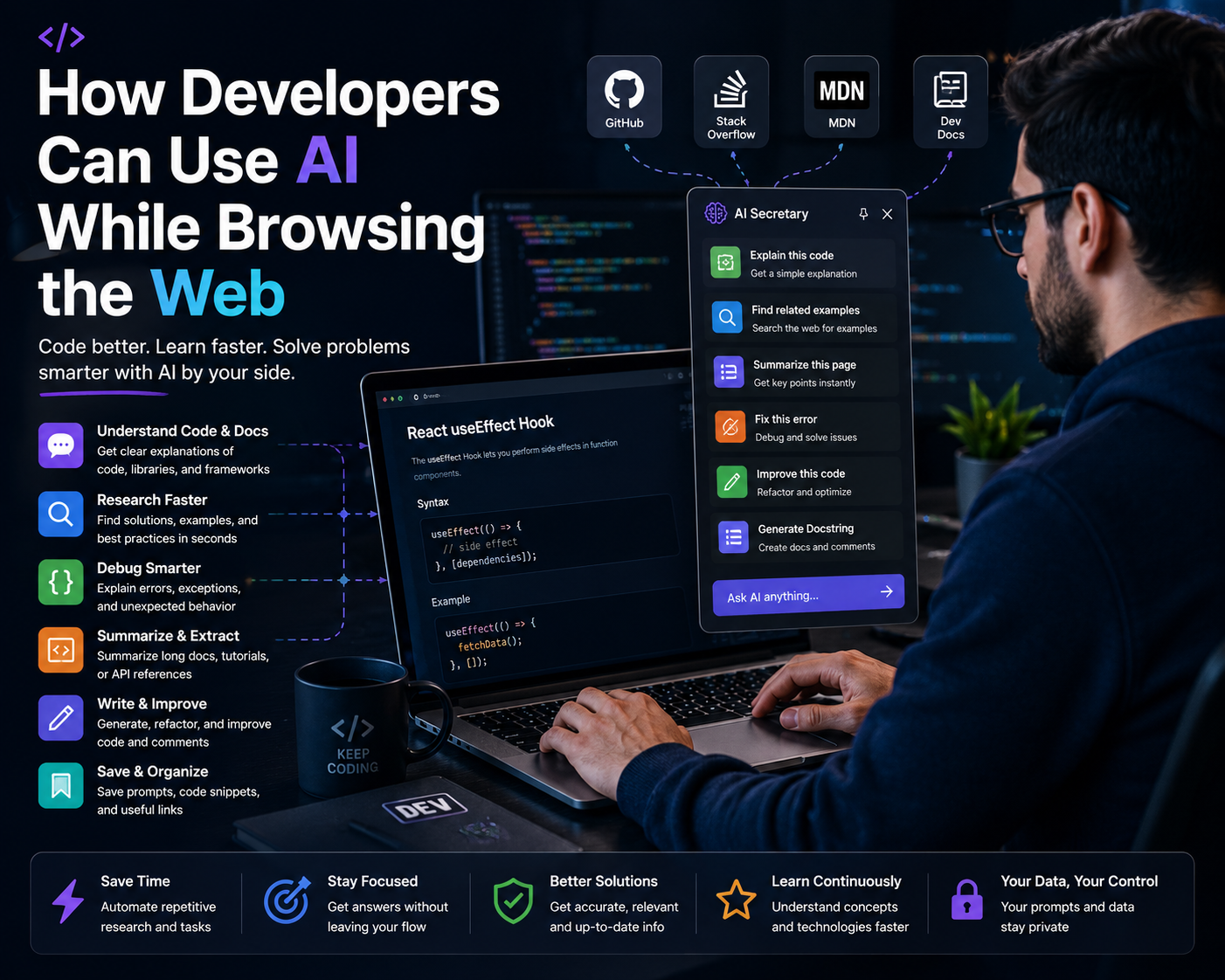
How Developers Can Use AI While Browsing the Web
Modern software development involves much more than writing code.
Developers constantly search the web for documentation, programming examples, API references, GitHub issues, Stack Overflow discussions, tutorials, error messages, framework guides, security information, and solutions to unfamiliar problems.
In fact, a large part of development involves understanding existing code and information rather than simply writing new code. Recent research into developer workflows has highlighted how much time developers spend on activities such as reading, navigating, and reviewing code.
Artificial intelligence can make this process more efficient.
Instead of switching constantly between a browser, an AI tool, documentation, an IDE, and search results, developers can use AI to help understand and work with the information they are already viewing.
In this guide, we will explore how developers can use AI while browsing the web, including practical examples for documentation, debugging, APIs, programming languages, frameworks, GitHub, security research, and learning.
Why Developers Spend So Much Time Browsing the Web
Even experienced developers rarely write software entirely from memory.
Developers constantly need to look up information such as:
- Programming language documentation
- Framework documentation
- API references
- Library documentation
- Code examples
- Error messages
- GitHub issues
- Stack Overflow discussions
- Technical tutorials
- Security advisories
- Database documentation
- Cloud platform documentation
- Deployment guides
- Browser APIs
- Command-line documentation
The problem is not necessarily finding information. The bigger challenge is understanding which information matters and applying it correctly to the current development problem.
AI can help developers turn the information they are already reading into useful explanations, questions, comparisons, and development tasks.
1. Use AI to Understand Documentation
Documentation is essential for developers, but technical documentation can sometimes be difficult to understand, especially when working with an unfamiliar framework or API.
Instead of simply reading a long documentation page, developers can ask AI questions about the content.
For example:
"Explain the main purpose of this API in simple terms and then show me how I would use it in a real application."
Another useful prompt is:
"Explain the important parts of this documentation that I need to understand before implementing this feature."
This can help developers quickly build an initial understanding before diving deeper into the official documentation.
2. Use AI to Understand Code Examples
Programming documentation often includes code examples.
However, developers may encounter examples written in languages or frameworks they are not familiar with.
AI can explain what the code is doing.
For example:
"Explain this code line by line. Identify the purpose of each function, parameter, and important programming concept."
You can also ask:
"Explain this code to an experienced JavaScript developer who is new to Python."
This can make documentation easier to understand without requiring the developer to independently research every unfamiliar concept.
3. Use AI to Research APIs
Working with APIs often requires developers to navigate multiple documentation pages.
You may need to understand authentication, endpoints, request parameters, response formats, error codes, rate limits, and SDKs.
AI can help organize this information.
For example:
"Based on this API documentation, explain the authentication process, required parameters, response structure, common errors, and provide a basic implementation example."
Developers can then verify the implementation against the official API documentation before using it in production.
4. Use AI to Understand Error Messages
Developers regularly encounter error messages that are difficult to understand.
An error might contain a technical description but provide little information about why the problem occurred in the developer's specific application.
AI can help translate an error into a more understandable explanation.
For example:
"Explain this error in simple terms, identify the most likely causes, and give me three possible ways to diagnose the problem."
You can also provide the surrounding documentation or technical webpage to give the AI more context.
Instead of immediately copying an error into a search engine and opening multiple results, developers can first use AI to understand what the error actually means.
5. Use AI to Research GitHub Issues
GitHub is one of the most valuable resources for developers.
When a library or framework behaves unexpectedly, developers may find useful information in GitHub issues and discussions.
AI can help analyze those discussions.
For example:
"Analyze this GitHub issue. Explain the original problem, the proposed solutions, the confirmed solution, and any limitations or workarounds mentioned by the developers."
This can save time when a GitHub issue contains a long conversation with many comments.
Developers should still verify important technical recommendations against the project's current documentation and source code.
6. Use AI to Understand Stack Overflow Answers
Stack Overflow and other developer communities contain millions of technical discussions.
Sometimes an answer solves a problem but does not explain why the solution works.
AI can help developers understand the reasoning behind an answer.
For example:
"Explain why this solution works. Identify the underlying programming concept and explain whether there are better alternatives in modern versions of the technology."
This turns a simple copy-and-paste solution into a learning opportunity.
7. Use AI to Compare Different Solutions
Developers often find several possible solutions to the same problem.
Choosing between them can be difficult.
AI can help compare alternatives.
For example:
"Compare these three solutions. Evaluate performance, readability, maintainability, security, scalability, and compatibility with modern development practices."
This can help developers understand the trade-offs before choosing an implementation.
8. Use AI to Learn New Programming Languages
Developers frequently need to learn new programming languages.
A developer who normally works with JavaScript might need to work with Python, Go, Rust, Java, C#, Dart, or another language.
AI can help explain unfamiliar syntax and concepts.
For example:
"I'm an experienced JavaScript developer learning Rust. Explain this Rust code by comparing its concepts with JavaScript where appropriate."
When browsing official language documentation, AI can also help explain unfamiliar terminology and examples.
9. Use AI to Learn New Frameworks
Frameworks can have large documentation websites containing hundreds or thousands of pages.
Developers can use AI to create a learning path while browsing those resources.
For example:
"Based on this framework documentation, what are the five concepts I should understand first before building a production application?"
Another useful question is:
"Create a step-by-step learning path based on this documentation, starting from the fundamentals and progressing toward advanced features."
This can make learning a new framework more structured.
10. Use AI to Understand Database Documentation
Developers frequently work with databases such as PostgreSQL, MySQL, MongoDB, Redis, SQLite, and other database systems.
Database documentation can contain complicated concepts involving indexing, transactions, queries, concurrency, replication, performance, and security.
AI can help explain these concepts while developers are researching them.
For example:
"Explain this database feature, when it should be used, how it affects performance, and what common mistakes developers should avoid."
11. Use AI to Research Cloud Services
Cloud platforms contain enormous amounts of documentation.
Developers may need to research services related to storage, databases, authentication, networking, serverless computing, containers, monitoring, or deployment.
AI can help summarize and organize information from the documentation developers are reading.
For example:
"Explain the purpose of this cloud service, when I should use it, what alternatives exist, and what the most important configuration options are."
Developers should always verify configuration details against current official documentation because cloud platforms change frequently.
12. Use AI While Learning Web Development
Web developers constantly browse documentation for HTML, CSS, JavaScript, browser APIs, frameworks, libraries, and web standards.
AI can help explain technical concepts directly from the pages developers are reading.
For example:
"Explain this JavaScript API, show me a simple example, explain common mistakes, and tell me when I should use it instead of the alternatives."
This can turn ordinary browsing into a more interactive learning process.
13. Use AI to Understand Security Documentation
Security is an important part of modern software development.
Developers may need to understand authentication, authorization, encryption, secure headers, input validation, dependency vulnerabilities, API security, and other security concepts.
AI can help explain security documentation and identify concepts that require further investigation.
For example:
"Explain the security recommendations on this page and identify which ones are most important for a production web application."
Security-related AI responses should always be verified against authoritative security documentation and current best practices.
14. Use AI to Research Libraries and Packages
Modern applications often depend on third-party libraries and packages.
Before adding a dependency, developers may want to understand its purpose, API, limitations, compatibility, and maintenance status.
AI can help developers formulate the right questions while researching a package.
For example:
"Based on this library's documentation, explain its main purpose, API design, dependencies, limitations, and situations where I should consider an alternative."
Developers should verify package versions, licensing, maintenance status, and security information independently before using a dependency in production.
15. Use AI to Debug While Browsing
Debugging often requires information from multiple sources.
A developer may have an error message in one tab, documentation in another, a GitHub issue in another, and their own code in an IDE.
AI can help connect the information conceptually.
For example:
"Based on this error message and the documentation, list the most likely causes and explain how I can test each possibility."
This encourages a diagnostic workflow rather than immediately changing code without understanding the problem.
16. Use AI to Research Before Writing Code
One of the best ways to use AI is before implementation begins.
Instead of immediately asking AI to write code, developers can ask it to help understand the problem first.
For example:
"Based on this documentation, what architecture would you recommend for implementing this feature? Explain the main components and trade-offs before providing any code."
This can help developers think through the problem before committing to an implementation.
17. Use AI to Understand Existing Projects
Developers frequently work on projects they did not originally create.
They may need to understand unfamiliar architecture, dependencies, APIs, and design patterns.
When browsing documentation related to the project, AI can help explain unfamiliar concepts.
For example:
"Explain how this technology works and identify which parts of its documentation are most relevant to understanding this existing project."
This can reduce the learning curve when joining an unfamiliar codebase.
18. Use AI to Research Technical Decisions
Software development involves many technical decisions.
Should you use REST or GraphQL? SQL or NoSQL? Server-side rendering or client-side rendering? Monolith or microservices?
AI can help structure the decision-making process.
For example:
"Compare these two approaches for a production application. Discuss performance, scalability, complexity, maintenance, security, developer experience, and long-term trade-offs."
The developer can then research the relevant documentation and real-world experience before making the final decision.
19. Use AI to Learn From Technical Articles
Technical blogs and tutorials can be valuable learning resources, but their quality can vary.
AI can help developers analyze an article and identify its main ideas.
For example:
"Summarize the main technical concepts in this article. Then identify which claims I should verify against official documentation."
This encourages developers to distinguish between an author's explanation and authoritative technical documentation.
20. Use AI to Turn Web Research Into Actionable Tasks
Developers often find useful information while browsing but then need to translate that information into actual development tasks.
AI can help with this transition.
For example:
"Based on this documentation, create a checklist of implementation tasks I need to complete to integrate this API into my application."
This can turn passive reading into an actionable development plan.
21. How EbraTech AI Secretary Can Help Developers
Developers spend a large amount of time moving between technical websites and AI tools.
They might read an API documentation page, search for an error, inspect a GitHub issue, read a tutorial, and then open an AI service to ask questions about what they found.
EbraTech AI Secretary is a Chrome extension designed to help users work with webpage context and selected content and prepare useful prompts for compatible AI services.
For developers, this can be useful when working with:
- Programming documentation
- API documentation
- GitHub pages
- Technical articles
- Tutorials
- Error explanations
- Framework documentation
- Library documentation
- Database documentation
- Cloud documentation
- Security resources
Instead of starting every AI interaction with a blank prompt, developers can use the context of the webpage they are already viewing to create more relevant questions and tasks.
The basic workflow is simple:
Browse ? Select or use webpage context ? Prepare a prompt ? Use your preferred AI service ? Review the result ? Verify the information ? Implement.
22. Example Developer AI Prompts
Documentation
"Explain this documentation in simple technical terms and identify the parts I need to understand before implementing it."
API Research
"Analyze this API documentation and explain authentication, endpoints, parameters, responses, errors, and a basic implementation workflow."
Error Debugging
"Explain this error, identify the most likely causes, and give me a systematic debugging process."
GitHub Issue
"Summarize this GitHub issue and explain the confirmed solution, alternatives, limitations, and whether the solution appears relevant to my situation."
Code Explanation
"Explain this code line by line and identify the important programming concepts I need to understand."
Framework Learning
"Based on this documentation, create a learning path from beginner concepts to advanced implementation."
Technical Comparison
"Compare these two approaches based on performance, security, maintainability, scalability, complexity, and developer experience."
Security
"Explain the security recommendations on this page and identify which ones are most important for a production application."
Research
"Based on this technical article, identify the main claims, assumptions, limitations, and points that I should verify using official documentation."
Implementation Planning
"Based on this documentation, create a step-by-step implementation checklist without writing the code yet."
23. AI Should Help Developers Understand, Not Just Generate Code
One of the biggest mistakes developers can make with AI is focusing only on code generation.
AI can also be extremely useful for understanding.
Before asking AI to write code, developers can ask it to explain:
- Why a particular technology is appropriate
- How an API works
- What a configuration option does
- Why an error occurs
- What the documentation means
- What trade-offs exist between two solutions
- What security risks should be considered
- What assumptions an implementation makes
This approach can help developers maintain a deeper understanding of their software instead of simply accepting generated code.
24. Always Verify AI-Generated Technical Information
AI can be extremely useful for software development, but developers should not blindly trust its answers.
AI can produce outdated APIs, incorrect code, wrong configuration options, nonexistent functions, or solutions that worked in an older version of a framework.
This is especially important because software libraries and frameworks change rapidly.
Always verify important technical information against:
- Official documentation
- Official GitHub repositories
- Release notes
- API references
- Security advisories
- Package repositories
- Current framework documentation
AI should help you find and understand information, but the official source should remain the authority for implementation details.
25. Be Careful With Private Code and Credentials
Developers should be careful when sharing information with AI services.
Never casually provide:
- API keys
- Passwords
- Private tokens
- Database credentials
- Private certificates
- Production secrets
- Private customer information
- Confidential company code
Before sending private code or information to an AI service, understand the service's privacy and data-handling policies and follow your organization's security requirements.
26. Use AI as Part of a Verification Workflow
A strong AI-assisted development workflow should include verification.
A practical workflow is:
Understand ? Ask AI ? Research ? Verify ? Implement ? Test ? Review.
For example, if AI suggests a solution to an API problem, do not immediately deploy it.
First check the official documentation, verify the API version, test the implementation, inspect the generated code, and make sure it behaves correctly in your environment.
This approach makes AI a productivity tool rather than a source of unverified code.
27. A Practical AI Browsing Workflow for Developers
Step 1: Find the Relevant Information
Search official documentation, GitHub, technical articles, developer communities, and other reliable sources.
Step 2: Read the Source
Do not immediately ask AI to replace the source. First understand what information the page provides.
Step 3: Ask Focused Questions
Ask AI to explain specific concepts, compare solutions, identify important details, or generate implementation questions.
Step 4: Verify the Answer
Compare AI's response with the official documentation and current version of the technology.
Step 5: Implement
Apply the solution to your project.
Step 6: Test
Run tests and verify that the implementation works in your actual environment.
Step 7: Review
Review the final code for correctness, security, maintainability, and compatibility.
Benefits of Using AI While Browsing
When used responsibly, AI can provide several benefits for developers.
Faster documentation research: AI can help developers understand technical documentation more quickly.
Better debugging: AI can help explain errors and suggest systematic debugging approaches.
Improved learning: Developers can ask questions about unfamiliar technologies while reading their documentation.
Better technical decisions: AI can help compare different approaches and identify trade-offs.
Reduced context switching: Developers can work more efficiently when they can turn the information they are already viewing into useful AI prompts.
More productive research: AI can help developers transform online information into implementation checklists, questions, comparisons, and development tasks.
The Future of AI and Web Browsing for Developers
AI is increasingly becoming part of the software development workflow.
Modern developer tools are moving beyond simple code completion toward systems that can understand documentation, search for information, analyze code, and assist with multi-step development tasks.
Research and industry tools increasingly demonstrate the importance of connecting AI with developer documentation and web resources. Developers may increasingly work with AI systems that can search, retrieve, analyze, and reason over technical information as part of a broader development workflow.
However, the fundamentals remain important: developers need to understand their systems, verify information, test implementations, and maintain control over important technical decisions.
Final Thoughts
Developers spend a significant amount of time browsing the web to solve programming problems, learn technologies, understand documentation, research APIs, investigate errors, and make technical decisions.
AI can make this process much more efficient.
Instead of treating AI only as a tool that writes code, developers can use it to understand documentation, analyze technical articles, explain errors, compare solutions, research APIs, learn frameworks, investigate GitHub issues, and turn web information into actionable development tasks.
The most effective approach is to combine AI assistance with human expertise.
Browse smarter. Understand faster. Build better.
For developers who spend much of their day researching technical information online, EbraTech AI Secretary can help make the transition from webpage research to AI-assisted development more convenient by working with webpage context and selected content to prepare useful prompts.
Frequently Asked Questions
How can developers use AI while browsing the web?
Developers can use AI to understand documentation, analyze code examples, explain error messages, research APIs, compare technical solutions, investigate GitHub issues, learn frameworks, and turn online information into actionable development tasks.
Can AI help developers understand documentation?
Yes. AI can explain complicated documentation, clarify terminology, summarize important concepts, analyze examples, and help developers identify which sections are most relevant to their current task.
Can AI help with debugging?
Yes. Developers can provide an error message, relevant documentation, or technical context and ask AI to explain possible causes and suggest a systematic debugging process. The proposed solution should always be tested and verified.
Can AI help developers learn new programming languages?
Yes. AI can explain unfamiliar syntax, compare concepts between programming languages, provide examples, and create learning paths based on documentation.
Can AI help developers research APIs?
Yes. AI can help explain API authentication, endpoints, parameters, responses, error codes, and implementation concepts based on information provided by the developer.
Should developers trust AI-generated code?
No. Developers should review, test, and verify AI-generated code. AI can produce outdated, incorrect, insecure, or incompatible solutions, especially when working with rapidly changing libraries and frameworks.
What is EbraTech AI Secretary?
EbraTech AI Secretary is a Chrome browser extension designed to help users work with webpage context and selected content and prepare useful prompts for compatible AI services.
How can EbraTech AI Secretary help developers?
EbraTech AI Secretary can help developers prepare prompts based on the webpage content they are viewing. This can be useful when reading documentation, technical articles, GitHub pages, tutorials, API references, and other developer resources.
Does EbraTech AI Secretary write code by itself?
EbraTech AI Secretary is designed primarily to help prepare webpage context and prompts for compatible AI services. The developer can then use the prepared prompt with their preferred AI service.
Does EbraTech AI Secretary replace a developer's AI coding tool?
No. It can complement existing AI tools by helping developers prepare more relevant prompts from the web content they are already researching.
Should developers still read official documentation?
Yes. AI should complement official documentation, not replace it. Developers should use authoritative documentation to verify API behavior, versions, configuration, security requirements, and other important technical details.